How to Fund Petty Cash in QuickBooks Online
How to Fund Petty Cash in QuickBooks Online
Funding petty cash moves money from your business bank account into the petty cash account. It gives you cash on hand for small day-to-day expenses while keeping the movement fully recorded — the bank account goes down, petty cash goes up, and nothing is treated as an expense until the cash is actually spent.
Step 1 – Open a New Transfer
A Create (+) – Click the Create button at the top of the left navigation bar to open the transaction menu.
B Transfer – Select Transfer under the Other column.
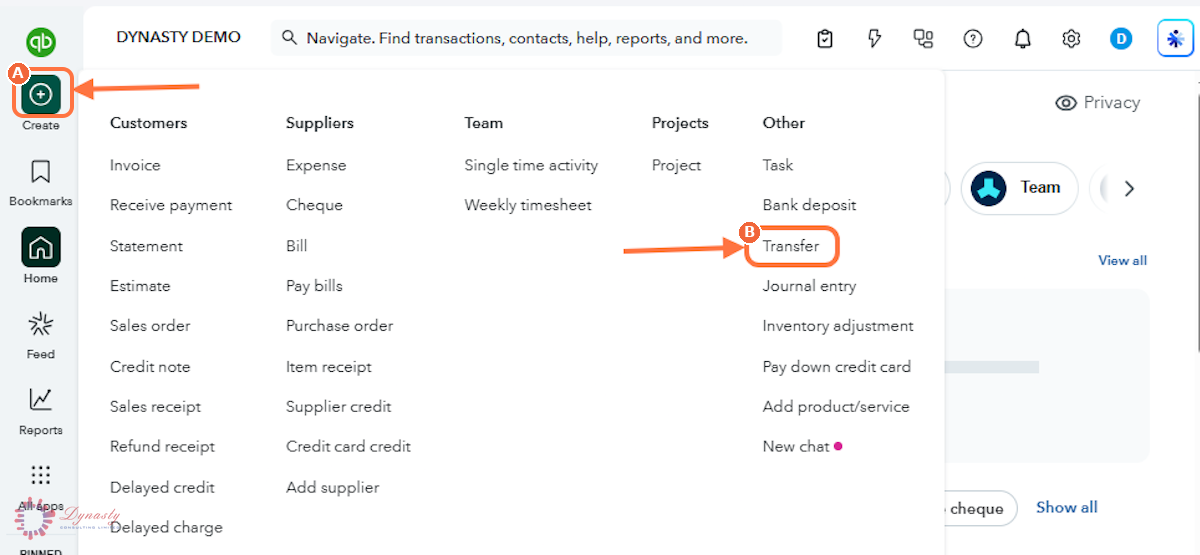
Figure – Opening a new transfer
Step 2 – Complete the Transfer and Save
The funds now sit in the Petty Cash account, ready to be spent. Record each purchase as an expense paid from Petty Cash so the balance always reflects the cash in the box.
A Transfer Funds From – Select the business bank account providing the money. Its current balance is shown to the right.
B Transfer Funds To – Select the Petty Cash account receiving the money.
C Transfer Amount – Enter the amount of the float being moved.
D Date – The date the cash was actually withdrawn, so both accounts move on the same day.
E Save and new – Records the transfer. Use the arrow beside the button for Save and close instead.
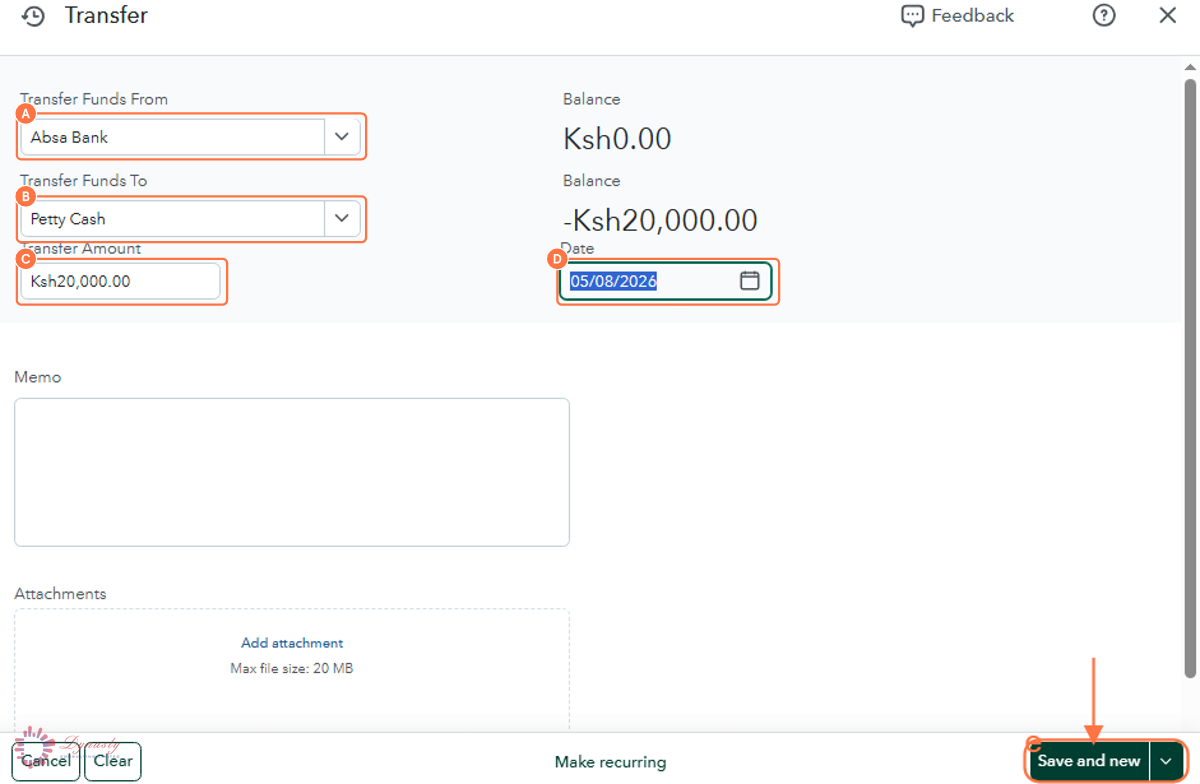
Figure – Completing the transfer
How to Fund Petty Cash in QuickBooks Online
Funding petty cash moves money from your business bank account into the petty cash account. It gives you cash on hand for small day-to-day expenses while keeping the movement fully recorded — the bank account goes down, petty cash goes up, and nothing is treated as an expense until the cash is actually spent.
Last Updated
Aug 19, 2026
Software
QuickBooks Online 2026
What You Will Learn
By the end of this guide you will be able to open a transfer, select the source and destination accounts, enter the amount and date, and record the transfer.
Before You Begin
A Petty Cash account must already exist in the Chart of Accounts. Decide the size of the float before you transfer — enough to cover a normal period of small purchases, not so much that it invites risk.
Tip
Top the float back up to the same figure each time — transfer exactly what has been spent. That way the cash in the box plus the receipts always equals the float, which makes checking it a two-minute job.
Step 1 – Open a New Transfer
There are no comments for now.
to be the first to leave a comment.